VUNex VMS

Recording and monitoring in one device

An all-in-one hardware NVR installed on site. View and record many cameras on one screen, and get VUNex AI detection alerts on the same screen.

Where it's usedRetailFactoriesBuildings · FacilitiesSchoolsSenior care
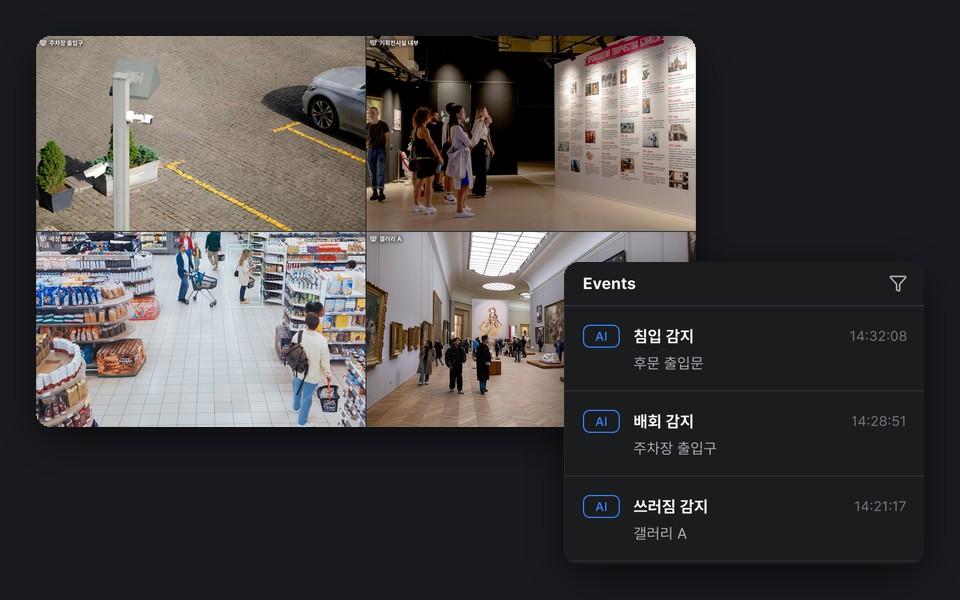
VUNex VMS monitoring screen: camera list and intrusion · loitering · fall · access denied · fire events on the left, and a 4-way view of parking lot · exhibit hall · store · gallery on the rightREC · Recording all channels
VUNex VMS all-in-one hardware NVRSample image
VUNex VMSAll-in-one hardware NVR · Recording · Monitoring · AI alerts in one device
VUNexAI detection alertJust now
Intrusion detectedUnderground parking B2 · Shown right on the monitoring screen
NVR

Recording + monitoring

Camera recording and live monitoring
in one device

AI integration

VUNex AI detection alerts
right on the monitoring screen

Security certification

NIS certification in progress
ready for public agencies

Launch and NIS (Korea's National Intelligence Service) certification are in progress, and we will share the schedule once confirmed. Screens show the actual product in development.

How it connects

At the center of your site,
it takes in cameras and AI
and links multiple sites

VUNex VMS handles on-site recording and monitoring, and connects to VUNex CMS when you view multiple sites together.

01What comes in from the site

CCTVConnects via RTSP · ONVIF
VUNex AISends detection alerts

02The device on site

VUNex VMS all-in-one hardware NVRSample image
VUNex VMSRecording · Monitoring · AI alerts in one device

03Where you view · What it links to

Monitoring screenLive · Playback
VUNex CMSMultiple sites on PC · web · mobile

Recording and monitoring are processed inside the on-site device.

Key features

Viewing, reviewing,
and managing,
all in one device

Everyday features for places that watch screens, like monitoring rooms, school offices, and nurse stations.

Actual VUNex VMS monitoring panel: 4-channel live video of parking lot · exhibit hall · store · gallery and a list of intrusion · loitering · fall events

Monitoring

View many cameras live on one screen and check AI detection alerts alongside.
Live videoPTZ controlAI detection alerts
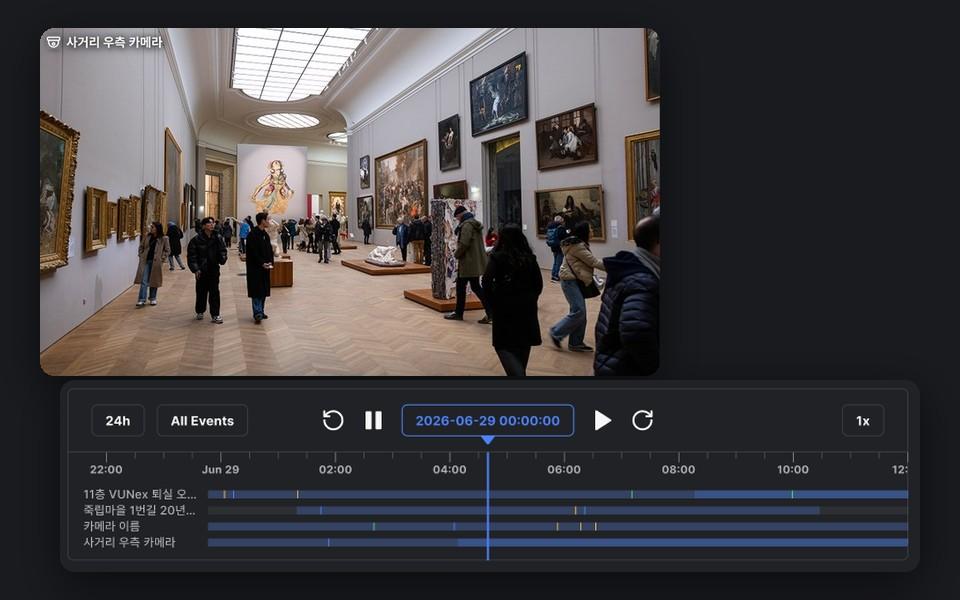
Actual VUNex VMS playback panel: one recorded video, 24h · All Events · play button · date picker, and timelines for 4 cameras

Recording · Playback

Play back multiple channels together,
and find scenes by sentence.
Multi-channel playbackFind video by sentence
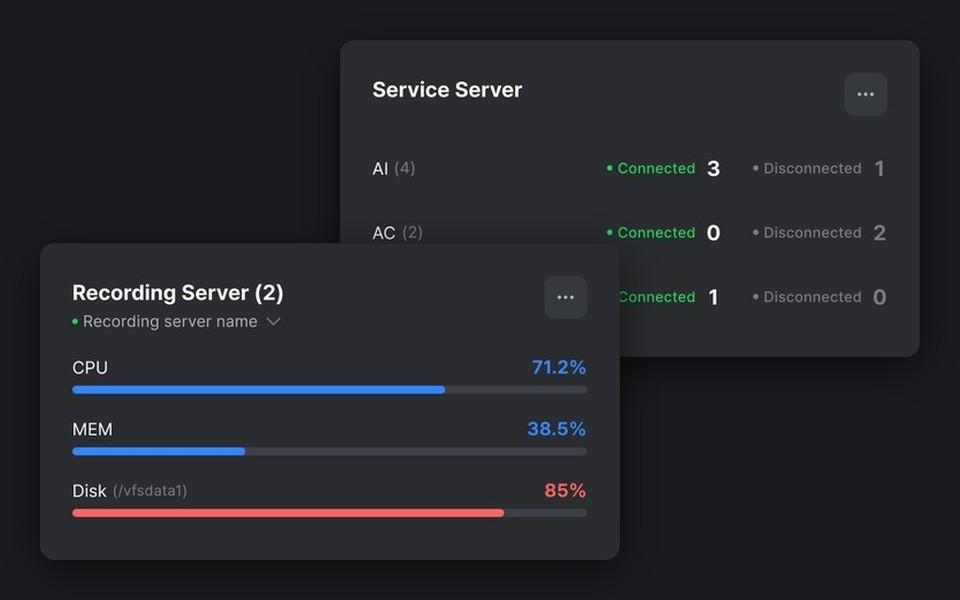
Actual VUNex VMS operations panel: recording server CPU · memory · disk usage (85%) and service server connection status

Operations

Manage user groups, permissions, and storage
from a single device.

User groups · PermissionsStorage management

Find video by sentence is available when used with VUNex AI. Screens show the actual product in development.

How to get started

Keep your recorder,
or combine it all in one device

Start one of two ways, depending on whether you already have a recorder.

If you have a recorder

Keep your recorder,
just add VUNex AI

CameraExisting recorder + AI analysis deviceEvent monitor
Your current recording and monitoring stay as they areRisk events appear on a dedicated screen
View VUNex AI

If you're buying new or replacing

One VUNex VMS for
recording · monitoring · AI alerts

CameraVUNex VMSSingle-screen monitoring
No separate recording server or monitoring software neededSee video and AI detection alerts on one screen
View multiple sites together with VUNex CMS

We are preparing NIS certification for public agency deployment. We will share launch and certification schedules once confirmed.

Specs

An all-in-one hardware NVR
installed on site

No separate recording server or monitoring software needed.

VUNex VMS all-in-one hardware NVR, a compact device with a power button, status LEDs, and USB ports on the frontSample image
Form factor
All-in-one hardware NVR (embedded)
Camera integration
RTSP · ONVIF
AI integration
VUNex AI detection alerts · Find video by sentence
Deployment
On-premises (installed on site)
Security certification
NIS certification in progress
Launch
Coming soon

Channel count and storage capacity will be listed once confirmed. Detailed configuration depends on the site check results.

VUNex VMS FAQ

Questions we hear
before deployment

No. You can just add VUNex AI to your existing recorder. When you buy a new recorder or replace one, VUNex VMS lets you run recording · monitoring · AI alerts on a single device.

Yes, if they are IP cameras that stream via RTSP · ONVIF. We check your cameras and network first during the free site check.

Group the VUNex VMS at each site with VUNex CMS, and view them together in the monitoring PC software · web · mobile app.

We are preparing NIS certification for public agency deployment. You can check public procurement status on the Public sector · Local government page.

We are preparing for launch and will share the schedule once confirmed. If you are considering it, we will first check your site with a free site check.

See if it fits
your site first

We check for free whether it works with your existing cameras and network.